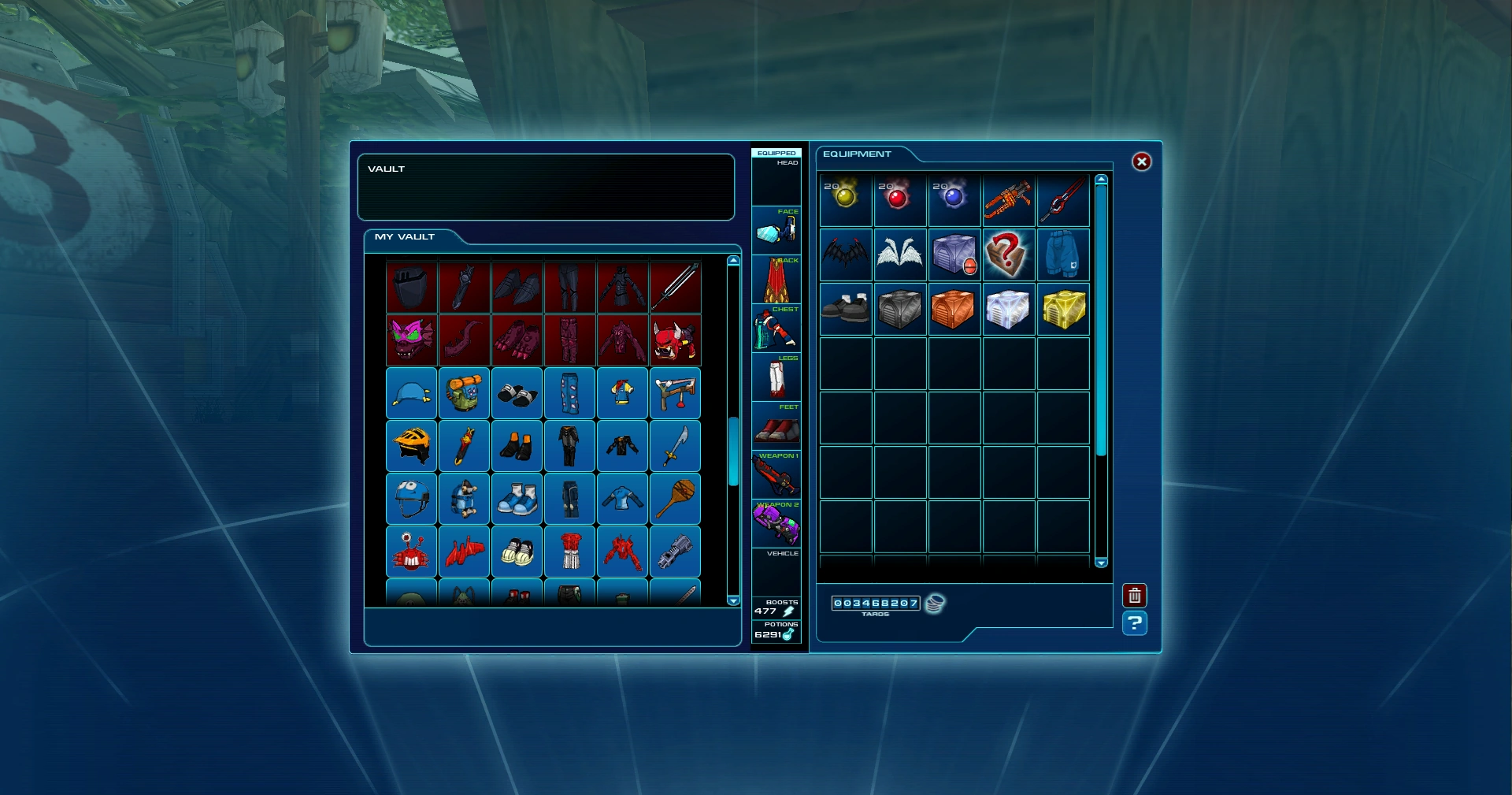

The Morbucks Savings and Loan vault with items inside it, from OpenFusion.
Items[1] are objects that appear in Cartoon Network Universe: FusionFall. They refer to the over one thousand collectible items that the Avatar can obtain over the course of the game. They each come with different attributes that can affect the Avatar's appearance and/or overall performance in gameplay.
Gameplay
In gameplay, items are obtained under certain circumstances. When starting a playthrough, the player is given a starter set for their default appearance. From there, they can obtain items by either buying them from Shopkeepers with Taros, clearing missions, or opening C.R.A.T.E.s, which are obtained by defeating Fusion Monsters, completing missions, or winning races inside Infected Zones. Notably, some missions reward specific items.
When first obtained, items are stored away in the player's Equipment tab on the Character Screen under the "My Stuff" selection on the Menu. The center (Equipped) column in the middle of the interface also shows how many Weapon Boosts and Nano Potions the Avatar carries.[1] By clicking on an item, the player can also open an "item description window"[1] or "item card"[2] that displays the attributes of the item.
On the right side side of the Character Screen interface is a display of the Equipment's item slots showcasing all the items the player has collected in their pack.[1] When all the slots under the Equipment tab are all filled out though, the player cannot obtain more items. To save storage in Equipment, the player can also store items away in Morbucks Savings and Loan's bank vault. To delete an inventory item, either drag it into the trash can on the Character Screen or press the trash can symbol on the item's item description window. Once an item has been deleted though, it cannot be retrieved.[1] In addition, the player can trade items at Shopkeepers for some Taros, although those items can be bought back for a while afterwards if the player regrets the trade. However, some items cannot be sold. The selling price can be seen on the item description window during the trade.
In Cartoon Network Universe: FusionFall, players can also trade items between each other, either via direct player trade or Email. However, some items, such as Guide Rewards and mission items, cannot be traded.[3] Some items, namely Guide Rewards from a certain Guide, are all rendered unusable as well if the player has switched to another Guide, although they get to keep the Guide Rewards and use them again if they switch back to the Guide that gave them.[4]
On the Character Screen, the player can equip items in their pack by selecting the Equipment tab. However, items can only be equipped if the player is equal to or at a higher level requirement than the item. To equip an item, click and drag the items over to the slots in the center (Equipped) column. Alternatively, open the item description window for an item and click on the Equip button and the item will appear on the Avatar, assuming it is the right level and it is not an Armor item for the opposite gender. If the player has an item in the Equipment inventory that they cannot use because it is for a level they have not achieved yet or it is for the opposite gender, it will have a red background. To unequip an item, click on the item in the center (Equipped) column to call up the item description window. Then click the Unequip button.
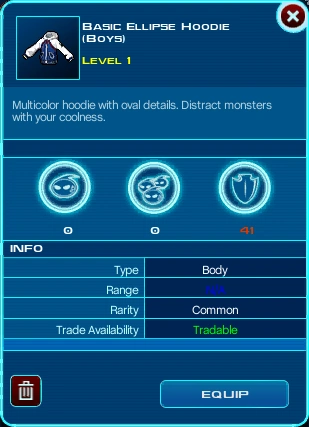

An item description window displaying a Body item's attributes, from OpenFusion.
Each item's item description widow will display most of the following attributes for it:
- Description: The name of the item as well as a brief description of it.
- Level: The minimum level the Avatar needs to be to equip the item. Level zero items are STYLE items designed to combine in the Croc Pot.
- Stats: How much the item will boost the Avatar's "vs. One", "vs. Many", and "Defense" ratings when equipped.
- Type: The type of the item. For weapons, it also decides the number of targets each weapon can hit.
- Range: For weapons only. It determine the range for how far away the Avatar can hit an enemy with a weapon.
- Speed: For vehicles only. It determines the speed the Avatar will travel while riding the vehicle.
- Rarity: Indicates if the item is Common, Uncommon, Rare, or Ultra Rare. The more rare an item is, the better the stats, but also the harder it is to come by. It also tells how much the item can be sold for to a Shopkeeper.
- Trade Availability: Shows if the item can be traded.
Also worth of note is that some items are gender-specific. This restriction is normally part of the item name: "Techaneer Shirt (Girls)", "Gorey Boots (Boys)", etc.
Most items can be divided into five broad categories: Accessories, Armor, Consumables, Vehicles, and Weapons. Weapons modifies the Avatar's combat skills, Armor modifies the player's defense, Accessories are used for decorative purposes, Vehicles allow the Avatar to move around faster, and Consumables can boost their gameplay performances.[5]
List of item types
Accessories
Accessories[5] are decorative items which do not affect gameplay. For the Avatar, they can only wear one type of each Accessory item at any given time. The Accessory category encompasses the following types of items:
- Backpacks: Accessories generally worn on the back.
- Glasses: Accessories generally worn over the face.
- Hats: Accessories generally worn on the head.
Armor
Armor[5] adds to the player's Defense statistic. For the Avatar, they can only wear one type of each Armor item at any given time, but their combined Defense values are added to the player's Defense statistic. The Armor category encompasses the following types of items:
- Body: Armor generally worn over the torso.
- Legs: Armor generally worn over the legs.
- Shoes: Armor generally worn over the feet.
Consumables
Consumables[5] can be used to boost the performances of Nanos and the Avatar's acquisition of Fusion Matter. Those items only exist in the Equipment pack until the player uses them to provide their effect and then they are consumed. The Consumables category encompasses the following types of items:
- Gumballs: Consumables for empowering Nanos.
- NanoCom Boosters: Consumables for boosting the Avatar's Fusion Matter acquisition.
Vehicles
Vehicles are modes of transportation which allow the player to travel faster outside of Infected Zones. When using a vehicle, players cannot use Nanos, engage in combat, interact with other players or NPCs, or use Emotes. However, they also protect the Avatar from toxic Fusion Matter patches on the ground. Vehicles have a rental period ranging from seven to fifteen days, after which they must be rented again.
Weapons
Weapons[5] modify the player's combat prowess. The player can equip two weapons to their Avatar at time and switch between them, with each one affecting the player's "vs. One" and "vs. Many" statistic; the higher the statistic, the more damage the player can deal to single and mobs of enemies, respectively. The Weapon category encompasses the following types of items:
- Melees: Short range. Good against single targets, good against mobs.[6]
- Pistols: Short range. Best against single targets, poor against mobs.[6]
- Rockets: Long range. Poor against single targets. Best against mobs. Does not use a target reticle.[6]
- Rifles: Long range. Best against single targets, poor against mobs.[6]
- Shatterguns: Long range. Good against single targets, good against mobs.[6]
- Throwns: Short range. Poor against single targets. Best against mobs. Does not use a target reticle.[6]
Miscellaneous
The following miscellaneous item types do no fit into any of the categories above:
- Nano Potions: Items for recharging a Nano's stamina bar.
- Power Items: Items for changing Nano Powers.
- Weapon Boosts: Items for boosting attack power.
References
- ↑ 1.0 1.1 1.2 1.3 1.4 Cartoon Network . Game Guide (English) (PDF) p. 42. Cartoon Network. Archived from the original on 20 October 2012. "Item Information - The item description window shows an item's attributes:"
- ↑ Cartoon Network . Game Guide (English) (PDF) p. 29. Cartoon Network. Archived from the original on 20 October 2012. "To use a NanoCom Booster, simply open up your inventory and click on the Booster item and choose [ACTIVATE] on the item card."
- ↑ Cartoon Network . Game Guide (English) (PDF) p. 36. Cartoon Network. Archived from the original on 20 October 2012. "Some items, such as guide rewards and mission items, cannot be traded."
- ↑ Cartoon Network . Game Guide (English) (PDF) p. 42. Cartoon Network. Archived from the original on 20 October 2012. "This will not cost you anything, but you will not be able to use any item rewards given to you by one guide once you have switched to another guide (you can keep the items, though, and use them again if you switch back to the guide that gave them to you)."
- ↑ 5.0 5.1 5.2 5.3 5.4 Cartoon Network . Game Guide (English) (PDF) p. 42-43. Cartoon Network. Archived from the original on 20 October 2012.
- ↑ 6.0 6.1 6.2 6.3 6.4 6.5 Grigon Entertainment (14 January 2009). Cartoon Network Universe: FusionFall (PC). Cartoon Network. Mission: Advanced Training (Part 2 of 6).
| Armor | |
|---|---|
| Weapons | |
| Accessories | |
| Consumables | |
| Miscellaneous | |
| Armor | |
|---|---|
| Weapons | |
| Accessories | |
| Consumables | |
| Miscellaneous | |
| Armor | |
|---|---|
| Weapons | |
| Accessories | |
| Consumables | |
| Miscellaneous | |