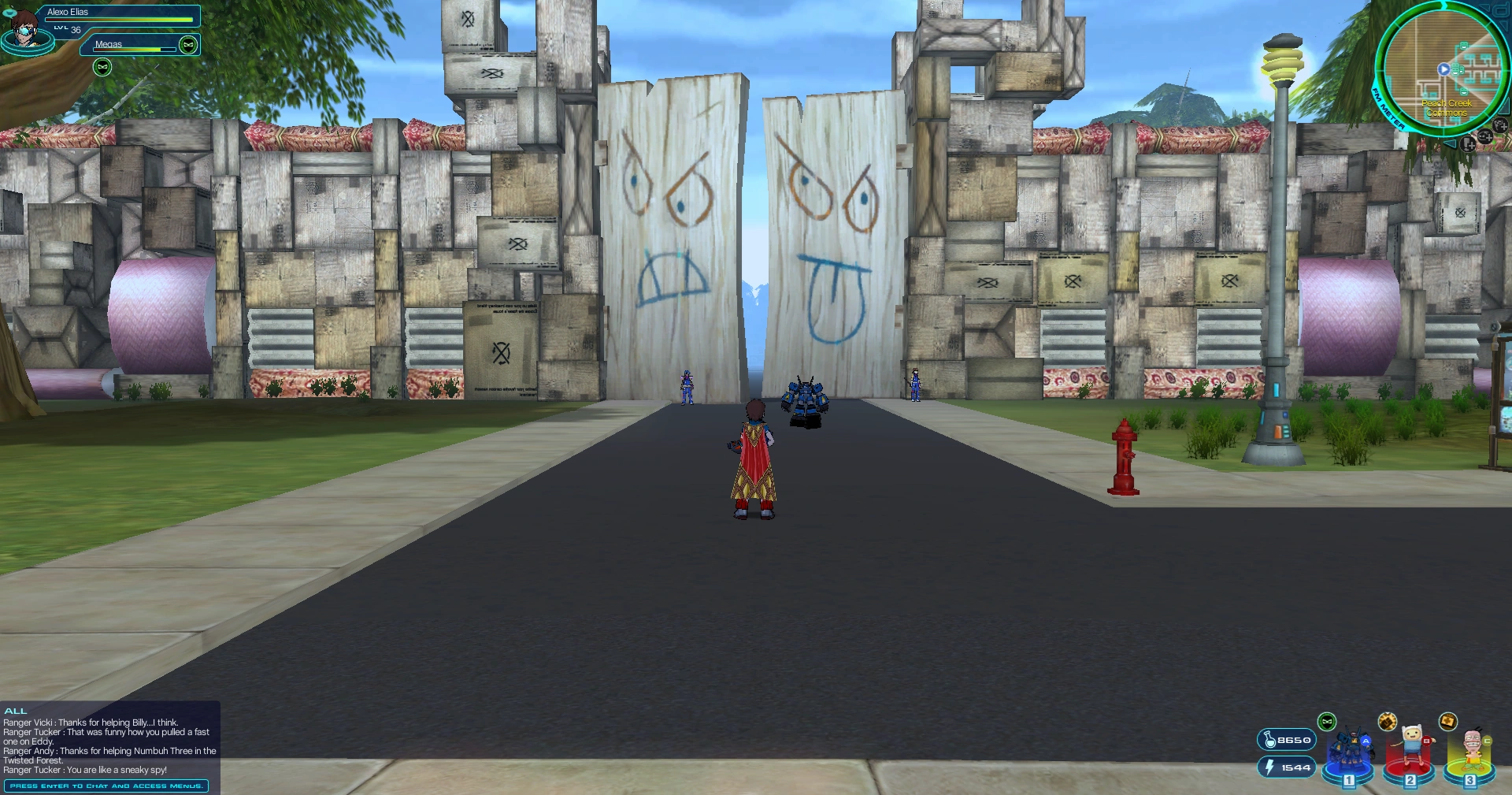

A display of the basic on-screen graphics for the NanoCom, from OpenFusion.
The NanoCom, also spelled as NanoComm,[1] is an object in Cartoon Network Universe: FusionFall. It is a new invention from DexLabs that is worn by the Avatar.[2][3] A marvel of technology, it combines communications, navigation aid, Nano storage, and Taro and Fusion Matter processors into one easy-to-use device.[2][3][4] When active, the user will see computer graphics superimposed over the world that keeps them informed amidst the Fusion Invasion.[2]
Gameplay
In gameplay, the NanoCom serves as the GUI in the Cartoon Network Universe: FusionFall world. It is automatically enabled when the player enters the game and remains active for as long as the player is online. To look up information and functionalities related to the Menu, one must press [Enter] to make additional Menu features with buttons appear on the NanoCom. The player can then click on the appropriate buttons to go to their sections.
While on-screen, the NanoCom will display a number of different graphics representing certain gameplay features.
Equipped Nanos
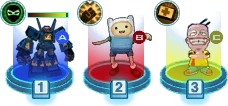

The Equipped Nanos, from OpenFusion.
The Equipped Nanos[2] represent the different Nanos the player has equipped to their Avatar at the moment, and their qualities and paramenters. They appear in the lower-right corner of the screen.
The Equipped Nanos are illustrated as a row of three dark blue cap-shaped slots with cyan outlines, with each slot having a separate number -- [1], [2] or [3] -- up front that corresponds to the matching key number on the keyboard. Each slot is reserved for one Nano, meaning the player can carry up to three Nanos at once. When a Nano is equipped to a slot, the former's icon will appear above the slot while surrounded by a red, blue, or yellow column of light that matches the Nano's type -- Adaptium, Blastons, or Cosmix. It will also show three different attributes for each Nano:
- A/B/C type:[5] Displayed on the right side of the Nano's icon in its assigned slot, it shows the type of the Nano with either a blue dot containing the letter "A" (Adaptium), a red dot containing the letter "B" (Blastons), or a yellow dot containing the letter "C" (Cosmix).
- Power:[5] Displayed on the upper left of the Nano's icon in its assigned slot, it shows which Nano Power the Nano currently has and if it is ready to use. The graphics of the Power icon depends on the Nano Power.
- Stamina level:[5] Displayed above the Nano's icon in its assigned slot, it shows its Nano's stamina bar, which showcases how long said Nano can remain summoned.
Should a Nano run too low on stamina, its icon will retract into its slot while it rests, rendering it unable to be summoned. As its stamina bar refills, the Nano's icon will slowly come out of its slot.
Mini-Map
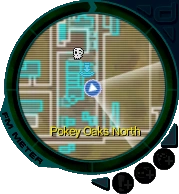

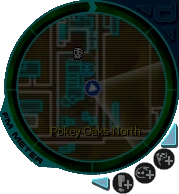
The Mini-Map, from OpenFusion.
The Mini-Map[2] represents a small, compass-like map of the Avatar's immediate surroundings. It appears in the top-right corner of the screen.
The Mini-Map is illustrated inside the round dial that represents the Fusion Matter Meter. Within it is a screen with faint horizontal lines that showcases a moving 2D radius chart of the landscape the Avatar finds themselves in from above. In addition, it will display the name of the area the Avatar is currently within in the lower half of the Mini-Map.
The Mini-Map's purpose is to assist and guide the player.[6] Inside the Mini-Map, various icons also appear, either automatically or under certain conditions, that serve as either different landmarks or indicators:
| Icon | Description |
|---|---|
 |
This icon always appears in the center of the Mini-Map. It indicates the Avatar's position. Along with it is also the white frame of a cone whose tip is connected to said icon on the Mini-Map, which marks the landscape within the Avatar's view. |
 |
This icon is a navigation point that appears when the player is on a mission. It directs the player to the location of the next task displayed on the Mini-Map to help them navigate. The current objective for the active mission will appear under the Mini-Map.[7] This navigation point appears on the edge of the Mini-Map should the target be outside the Mini-Map's radius, always pointing towards the player's target objective. It should be noted that this arrow points directly towards the destination; it does not account for barriers like mountains, monsters or buildings that one may have to go around to get to the final location. As such, it is advisable to always check the map for the best route.[6][7] |
 |
This icon indicates the position of the goals of missions. When the player gets their goal within the Mini-Map's radius, the navigation point for leading the Avatar to it will turn into this icon, called a Waypoint.[6] If there is a plus sign (+) inside the Waypoint, then the target is above the Avatar, perhaps on a building or a floating platform. If there is a minus sign (-) inside the Waypoint however, then the target is below the Avatar.[6][7] |
 |
This icon indicates the position of a local Accessory Shopkeeper. |
 |
This icon indicates the position of a local Body Shopkeeper. |
 |
This icon indicates the position of a local Legs Shopkeeper. |
 |
This icon indicates the position of a local Shoes Shopkeeper. |
 |
This icon indicates the position of a local Weapon Shopkeeper. |
 |
This icon indicates the position of a local E.G.G.E.R.. |
 |
This icon indicates the position of a local Nano Potion, Weapon Boost, and/or Gumball Shopkeeper. |
 |
This icon indicates the position of a local miscellaneous Shopkeeper. |
 |
This icon indicates the position of a local Vehicle Shopkeeper. |
 |
This icon indicates the position of a local Morbucks Savings and Loan banker. |
 |
This icon indicates the position of a local Croc Pot vendor. |
 |
This icon indicates the position of a local NPC. |
 |
This icon appears on the Mini-Map when the player is inside a Fusion Lair. It indicates the position of the local Fusion in the vicinity. |
 |
This icon indicates the locations of local Fusion Monsters or other monsters in the vicinity. It typically appears on the Mini-Map when the Radar Nano Power is in effect. Otherwise, it only shows up for boss opponents during special situations, such as for Mandark, Mojo Jojo, and Vilgax during "Bet on Ben (Part 4 of 5)". |
 |
This icon indicates the position of a local Resurrect 'Em. |
 |
This icon indicates the position of a local Guide Changer. |
 |
This icon indicates the position of a local Nano Station. |
 |
This icon indicates the position of a local S.C.A.M.P.E.R. |
 |
This icon indicates the position of a local Monkey Skyway Agent. |
 |
This icon indicates the position of a local warp portal, such as Fusion Portals, warp gates, the Kumari Serpent, Whoosh, etc. |
 |
This icon indicates the position of a local Recall Point. |
 |
This icon indicates the starting position of a local Race. |
 |
This icon indicates the finishing position of a local Race. |
 |
This icon appears on the Mini-Map when the player has teamed up with other players in a group. It indicates the positions of all the other group members in the vicinity. |
 |
This icon appears on the Mini-Map when the Treasure Finder Nano Power is in effect. It indicates the positions of any of Coco's Eggs within a certain radius of the Avatar. |
Notably, the Mini-Map does not work properly inside Fusion Lairs; while it can highlight points of interest via icons, it cannot display 2D maps of the surroundings.
Fusion Matter Meter
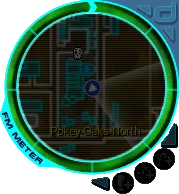

The Fusion Matter Meter, from OpenFusion.
The Fusion Matter Meter[2] represents the amount of Fusion Matter that the Avatar has stored up. It appears in the top-right corner of the screen.
The Fuson Matter Meter underwent a few design changes over the course of Cartoon Network Universe: FusionFall. Generally speaking, though, it consists of a dark blue gauge with cyan outlines around the Mini-Map. Inside it is a green bar that indicate the current amount of Fusion Matter that the player possesses; the more Fusion Matter one gathers, the larger the bar gets. Once the Fusion Matter Meter tops out, the Avatar will gain a level (originally a new Nano Mission) and the Fusion Matter Meter resets visually without the Avatar losing Fusion Matter. The Fusion Matter Meter can then be filled up again for the same results up until the Avatar reaches level thirty-six.
The Fusion Matter Meter has additional graphics associated with the "NanoCom Efficiency" mechanic. If the player has all three main NanoCom Booster types active at once, the Fusion Matter Meter will pulse brightly.[2]
Originally, the Fusion Matter Meter's bar would sparkle at 100% NanoCom efficiency, then turn dull at 50% NanoCom efficiency, and finally dark at 0% NanoCom efficiency.[8] Following an update, it would pulse green, gold and glowy at 200% NanoCom efficiency, be plain green at 100% NanoCom efficiency, and finally turn red at 0% NanoCom efficiency.[9] Those effects were later discarded along with the efficiency decreasing factor.
Boosts

The Boosts, from OpenFusion.
The Boosts[2] represent the types of NanoCom Boosters currently in effect. They appear along the bottom-right rim of the Fusion Matter Meter.
The Boosts are illustrated as a line of three round and gray-colored icons along the Fusion Matter Meter, each one representing one of the three main types of NanoCom Boosters. The one at the top with the icon of a checkered flag and a plus sign (+) represents the Infected Zone Racer Booster; the one in the middle with the icon of a Fusion Spawn and a plus sign (+) represents the Fusion Hunter Booster; and the one at the bottom with an exclamation sign (!) and a plus sign (+) represents the Quester Booster. When any of those NanoCom Boosters are active, their icon on the NanoCom will turn green. If all three of them are active at once, the Fusion Matter Meter will pulse brightly as well.[2]
Communication Log
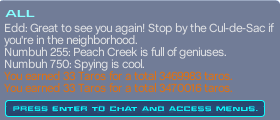

The Communication Log, from OpenFusion.
The Communication Log[2] presents a record of recent communications and events. It appears in the bottom-left corner of the screen.
The Communication Log is illustrated as a simple transparent black and rectangular field with text inside it that is constantly picked up from around the Avatar as new events occur. However, it can only list a limited number of events; once that limit is exceeded, it will start deleting the oldest as new events are logged. These events include:
- Barker quotes from nearby NPCs in the field or during missions.
- Visible chat among local players, be it either Menu Chat or Open Chat, including one's own.
- Buddy requests and the players' responses to them.
- The numerical value of Taros and Fusion Matter earned from monsters and missions.
- Obtaining a temporary Nano Power from one of Coco's Eggs.
- The recovery of a C.R.A.T.E. from defeated monsters.
At the bottom of the Communication Log is a dark blue field with a cyan outline that says "Press enter to chat and access menus." By opening said Menus, the player can chat with other players using either Menu Chat or Open Chat via different communication channels. Those communication channels can as well filter out certain quotes that the Communication Log picks up from the surroundings, namely:
- All: Quotes said by everyone (both players and NPCs) nearby.
- Group: Quotes said exclusively by the group that the player is currently a part of.
- Buddy: Quotes said exclusively by a Buddy that the player is currently online with.
Your Health


Your Health, from OpenFusion.
Your Health[2] represents the Avatar's health status. It appears in the top-left corner of the screen.
Your Health is illustrated as a stylized semi-transparent dark blue bar with a cyan outline. On the left edge is a dark blue cap-shaped slot with a cyan outline that displays an animated picture of the current Avatar's head inside it. Inside the main bar is also the Avatar's Health Bar, which shows the Avatar's current health points. There is no numerical indicator for health on the NanoCom, though that can be viewed on the Character Screen on the Menu. Above the Health bar on the left is also the Avatar's name, and below it on the same side is the player's current level.
Active Nano


Active Nano, from OpenFusion.
The Active Nano[2] represents the key parameters for any Nano that the player has summoned. It appears below the Avatar's Health Bar, in the top-left corner of the screen.
The Active Nano is illustrated as a stylized semi-transparent dark blue bar with a cyan outline, much like Your Health. Spanning most of said bar is a bigger version of the summoned Nano's stamina bar. The Nano's name is as well displayed on the top left side of the stamina bar, and the Power icon representing the Nano's current Nano Power is displayed on the right side of the stamina bar. Notably, using certain Nano Powers will make a cooldown meter in the form of a circular white gauge bar appear over the Power icon; while that gauge empties, the Avatar cannot use the Nano's Nano Power. Once the gauge bar empties, the cooldown meter disappears, and the Nano Power becomes usable again.
Effects
 |
 |
 |
 |
 |
 |
 |
 |
 |
 |
 |
 |
 |
 |
 |
 |
 | |||
Effects[2] represents the current status for the Avatar. It appears below Your Health, right under the Active Nano in the top-left corner of the screen.
Effects are illustrated in the form of icons that appear for as long as the Avatar's status is affected. Multiple icons can appear at once, as a horizonal row of images. The icons that can appear on Effects include the temporary Nano Powers obtained from Coco's Eggs, any Auto-derived Nano Power belonging to the Nano that the Avatar has summoned, the Stun - Cone icon for when the Avatar gets stunned by monsters, or the toxicity icon for when coming into contact with Fusion Matter in the field.
History
Cartoon Network Universe: FusionFall
Fusion Invasion
The Future
| This section is a stub. You can help FusionFall Wiki by expanding it. |
When they took part in Dexter's time travel experiment, the Avatar was wielding a communicator for reconnecting with Computress when they would be sent to the future.[10] Arriving in a future set during the darkest days of the Fusion Invasion, the communicator allowed the Avatar to receive instructions from Computress to brave the chaos amidst the battle for Tech Square. When they later slew Fusion Buttercup and obtained their first Nano, the Avatar's communicator was upgraded into a proper NanoCom.[11]
The Past
| This section is a stub. You can help FusionFall Wiki by expanding it. |
Functionalities
Functionalities exhibited by the NanoCom include:
- Augmented Reality: When active, the NanoCom superimposes computer graphics over the world from the user's view that keeps them informed amidst the Fusion Invasion.[2] That information includes subjects such as statuses and attributes of the user and their equipped Nanos, the efficiency of the NanoCom, stored Fusion Matter and Taros, and logged communication.
- Anti-Gravity: Following a patch from DexLabs, the NanoCom became able to generate a mild anti-gravity aura for slowing down the user's falls.[12]
- Communication: The NanoCom provides the user with communication with different people,[2] such as mission handlers.
- Data Acquisition: The NanoCom is capable of acquiring data by recording readings from certain objects, such as bioids.[13]
- Data Storage: The NanoCom is capable of having data downloaded to it and store it, such as access codes, coordinates, and other forms of data.[14][15][16]
- Energy Detection: The NanoCom can detect and lock onto different energy readings.[17]
- Fusion Matter Process Manipulation: The NanoCom serves as a processor for the Fusion Matter gathered by the user, tracking how much of the substance that has been earned. While it can run at normal efficiency forever, one can boost it beyond 100% efficiency for a short while using either the Scavenge Nano Power or NanoCom Boosters.[4][18]
- Nano Storage: The NanoCom can host up to three Nanos at once that the user can summon at their leasure while the latter have the energy.[2] To swap Nanos, the NanoCom must interface with a local Nano Station hosting other Nanos.
- Nano Synthesization: Seemingly thanks to the Great Machine,[19] the NanoCom can synthesize Nanos when provided with the right resources and enough information.[1][20]
- Navigation: The NanoCom comes with a built-in mini-map, which showcases an overhead view of the immediate area fed directly through the NanoCom. It is also comes with a navigation system that shows the user's current position and any waypoints that must be reached, as well as locations of other useful characters and devices.[2][21][22]
- Registration: The NanoCom can register the user's profile in a number of devices and systems:
- Transportation Registry: The NanoCom can register the user at a number of traveling points around the Earth for the S.C.A.M.P.E.R.s and Monkey Skyway Agent system for profile recognition. If the NanoCom can register the user at both points of origin for a transportation system, the user can utilize said system for a fee.[23]
- Recall Point Registry: The NanoCom can register a Recall Point for a Nano with the Recall Nano Power to warp the user to. However, it can only register one Recall Point at a time, and it will lose said registry when moved outside an Infected Zone.[24]
- Teleportation: The NanoCom allows the user to "warp" directly to the location of a buddy when they are present.[25]
Patch Notes
The following list contains the Patch Notes pertaining to the NanoCom in Cartoon Network Universe: FusionFall:
- 01.09.2009: A number of issues and glitches that included the wrong NPCs showing up in the NanoCom was patched.[26]
- 02.25.2009: The color of the Fusion Matter Meter when the NanoCom was exhausted was changed so that it would be easier to read.[27]
- 04.01.2009: Some glitches that caused the wrong NPCs to appear in the NanoCom when they were not supposed to were patched.[28]
- 06.17.2009: The NanoCom and Nanos were updated to show when the player's Nano is within range for it.[29]
- 07.01.2009: The NanoCom's looks were updated to make it more clear to players what stage their "NanoCom Effieciency" was in. From there on, the Nano Time would "ding" at the 12:00 postion (instead of the 6:00 position). When the player's efficiency was at 200% it would pulse green, gold and glowy. At 100% it would just be green. When the player's efficiency was at 0% though, it would be red.[30]
- 01.20.2010:
- The "NanoCom Efficiency" mechanic that decreased the amount of Fusion Matter and Taros earned until the player stopped receiving it all together, and would not reset unless the player logged off the game for twenty-four hours until the NanoCom could recharge, was removed.[31]
- A few icons were added to the NanoCom to display which NanoCom Boosters were in effect.[31]
- Some aspects of the UI were updated due to the changes in the NanoCom and the boosts.[31]
Trivia
References
- ↑ 1.0 1.1 Grigon Entertainment (14 January 2009). Cartoon Network Universe: FusionFall (PC). Cartoon Network. Mission: Basic Training (Part 3 of 3). "Ben: We learned why when we found Fusion Finn hanging around. We have cornered him in the building over there. If you can take him out, your NanoComm should get what it needs for you to make your first Nano."
- ↑ 2.00 2.01 2.02 2.03 2.04 2.05 2.06 2.07 2.08 2.09 2.10 2.11 2.12 2.13 2.14 2.15 2.16 Cartoon Network . Game Guide (English) (PDF) p. 7. Cartoon Network. Archived from the original on 20 October 2012.
- ↑ 3.0 3.1 Grigon Entertainment (14 January 2009). Cartoon Network Universe: FusionFall (PC). Cartoon Network. "Game Guide (Adventuring): You character is equipped with a new invention from Dexlabs called the NanoCom. The NanoCom combines navigation, communications and Nano storage into one easy-to-use device. When using it, you'll see computer graphics superimposed over the world that will keep you informed as you battle the Planet Fusion invasion."
- ↑ 4.0 4.1 Cartoon Network . Game Guide (English) (PDF) p. 29. Cartoon Network. Archived from the original on 20 October 2012.
- ↑ 5.0 5.1 5.2 Cartoon Network . Game Guide (English) (PDF) p. 19. Cartoon Network. Archived from the original on 20 October 2012.
- ↑ 6.0 6.1 6.2 6.3 Did You Know? #10. Cartoon Network (8 April 2009). Archived from the original on 26 April 2010.
- ↑ 7.0 7.1 7.2 Cartoon Network . Game Guide (English) (PDF) p. 13. Cartoon Network. Archived from the original on 20 October 2012.
- ↑ Cartoon Network . Game Guide (English) (PDF) p. 44–46. Cartoon Network. Archived from the original on 5 February 2009.
- ↑ Cartoon Network . Game Guide (English) (PDF) p. 37. Cartoon Network. Archived from the original on 14 January 2010.
- ↑ Grigon Entertainment (14 January 2009). Cartoon Network Universe: FusionFall (PC). Cartoon Network. "Dexter: Excellent. Bio-scan is complete. Let's make sure your communicator is functioning. / Computress: All communication systems are functional, Dexter. I will be able to reconnect with the volunteer upon arrival in the future."
- ↑ Grigon Entertainment (14 January 2009). Cartoon Network Universe: FusionFall (PC). Cartoon Network. Area/level: Fusion Buttercup's Lair (The Future). "'Computress: Your communicator is now a NanoCom. It has the ability to store up to three Nanos."
- ↑ Patch Notes: 2/16/2011 (PDF). Cartoon Network Universe: FusionFall : Community/News. Cartoon Network (16 February 2011). Archived from the original on 20 April 2011.
- ↑ Grigon Entertainment (14 January 2009). Cartoon Network Universe: FusionFall (PC). Cartoon Network. Mission: Echo Echo Encounter. "'Ben: Use your NanoCom to take readings from some of these bioid Echo Echos. And maybe take a few of them out in the process."
- ↑ Grigon Entertainment (14 January 2009). Cartoon Network Universe: FusionFall (PC). Cartoon Network. Mission: Base Case, Part One. "Numbuh Two: Ben sent me the location of a secret Plumber base access port over in Peach Creek Estates. He uploaded a special access code to your NanoCom."
- ↑ Grigon Entertainment (14 January 2009). Cartoon Network Universe: FusionFall (PC). Cartoon Network. Mission: Major Miner. "Numbuh Two: Ben wants us to access some info from a remote data miner. You'll need to synchronize both Plumber access ports and download the data to your NanoCom."
- ↑ Grigon Entertainment (14 January 2009). Cartoon Network Universe: FusionFall (PC). Cartoon Network. Mission: Panicked Attack. "Numbuh One: I'll send the coordinates to your NanoCom."
- ↑ Grigon Entertainment (14 January 2009). Cartoon Network Universe: FusionFall (PC). Cartoon Network. Mission: Alligators in the Sewers!. "Rex: Ok. Your nanocom is definitely locked on to another energy reading. Blast your way through those Slime Serpents."
- ↑ Grigon Entertainment (14 January 2009). Cartoon Network Universe: FusionFall (PC). Cartoon Network. "Computress: Your NanoCom tracks how much Fusion Matter you have earned. When you fill up the outer ring with Fusion Matter you will gain a level."
- ↑ Grigon Entertainment (14 January 2009). Cartoon Network Universe: FusionFall (PC). Cartoon Network. Mission: Hands Off. "Mandy: If Fuse destroys the Great Machine, kids won't be able to make Nanos."
- ↑ Grigon Entertainment (14 January 2009). Cartoon Network Universe: FusionFall (PC). Cartoon Network. Mission: Basic Training (Part 3 of 3). "Ben: All right! It's time to fight Fusion Finn. Once you defeat him, your Nanocomm will have all the information it needs to create your first Nano."
- ↑ Grigon Entertainment (14 January 2009). Cartoon Network Universe: FusionFall (PC). Cartoon Network. Area/level: Tech Square (The Future). "Computress: Your communicator comes with a built-in mini-map. It will show you how to reach Numbuh Two."
- ↑ Cartoon Network . Game Guide (English) (PDF) p. 40. Cartoon Network. Archived from the original on 20 October 2012.
- ↑ Grigon Entertainment (14 January 2009). Cartoon Network Universe: FusionFall (PC). Cartoon Network. Mission: Going Places. "Computress: Subject: Transportation. When using a SCAMPER or other form of transportation, you must first register at both your point of origin and at your destination with your NanoCom. That way, the systems know who you are."
- ↑ Cartoon Network . Game Guide (English) (PDF) p. 27. Cartoon Network. Archived from the original on 20 October 2012.
- ↑ Grigon Entertainment (14 January 2009). Cartoon Network Universe: FusionFall (PC). Cartoon Network. "Computress: Use your NanoCom to warp directly to your buddies when they are logged on."
- ↑ Dancingzombie (13 January 2009). Latest Patch Notes!. Cartoon Network Universe: FusionFall : Forums. Cartoon Network. Archived from the original on 20 January 2009.
- ↑ Dancingzombie (19 February 2009). Patch Notes 2.25.09. Cartoon Network Universe: FusionFall : Forums. Cartoon Network. Archived from the original on 1 May 2009.
- ↑ Dancingzombie (1 April 2009). Latest Patch Notes (For realz this time). Cartoon Network Universe: FusionFall : Forums. Cartoon Network. Archived from the original on 7 April 2009.
- ↑ Dancingzombie (16 June 2009). Patch Notes 6.17.09. Cartoon Network Universe: FusionFall : Forums. Cartoon Network. Archived from the original on 7 July 2009.
- ↑ Dancingzombie (1 July 2009). Latest Patch Notes!. Cartoon Network Universe: FusionFall : Forums. Cartoon Network. Archived from the original on 7 July 2009.
- ↑ 31.0 31.1 31.2 Dancingzombie (20 January 2010). Latest Patch Notes!. Cartoon Network Universe: FusionFall : Forums. Cartoon Network. Archived from the original on 29 March 2010.
- ↑ Grigon Entertainment (14 January 2009). Cartoon Network Universe: FusionFall (PC). Cartoon Network. Area/level: Pokey Oaks South. "Albedo: Are those NanoCom devices related to the Omnitrix?"